







































New to KubeDB? Please start here.
GitOps Overview for Kafka
This guide will give you an overview of how KubeDB gitops operator works with Kafka databases using the gitops.kubedb.com/v1alpha1 API. It will help you understand the GitOps workflow for
managing Kafka databases in Kubernetes.
Before You Begin
- You should be familiar with the following
KubeDBconcepts:
Workflow GitOps with Kafka
The following diagram shows how the KubeDB GitOps Operator used to sync with your database. Open the image in a new tab to see the enlarged version.
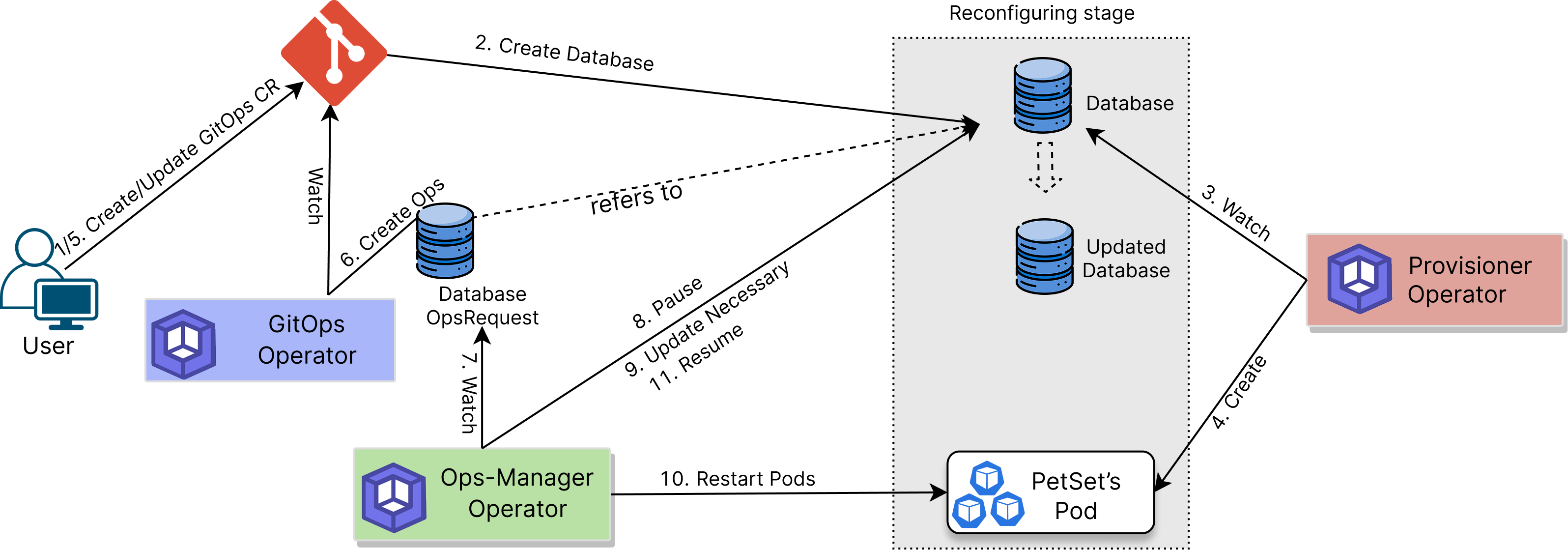
- Define GitOps Kafka: Create Custom Resource (CR) of kind
Kafkausing thegitops.kubedb.com/v1alpha1API. - Store in Git: Push the CR to a Git repository.
- Automated Deployment: Use a GitOps tool (like
ArgoCDorFluxCD) to monitor the Git repository and synchronize the state of the Kubernetes cluster with the desired state defined in Git. - Create Database: The GitOps operator creates a corresponding KubeDB Kafka CR in the Kubernetes cluster to deploy the database.
- Handle Updates: When you update the KafkaGitOps CR, the operator generates an Ops Request to safely apply the update(e.g.
VerticalScaling,HorizontalScaling,VolumeExapnsion,Reconfigure,RotateAuth,ReconfigureTLS,VersionUpdate, ansRestart.
This flow makes managing Kafka databases efficient, reliable, and fully integrated with GitOps practices.
In the next doc, we are going to show a step by step guide on running Kafka using GitOps.